Published November 6, 2026. Last updated November 9, 2026.
Short answer
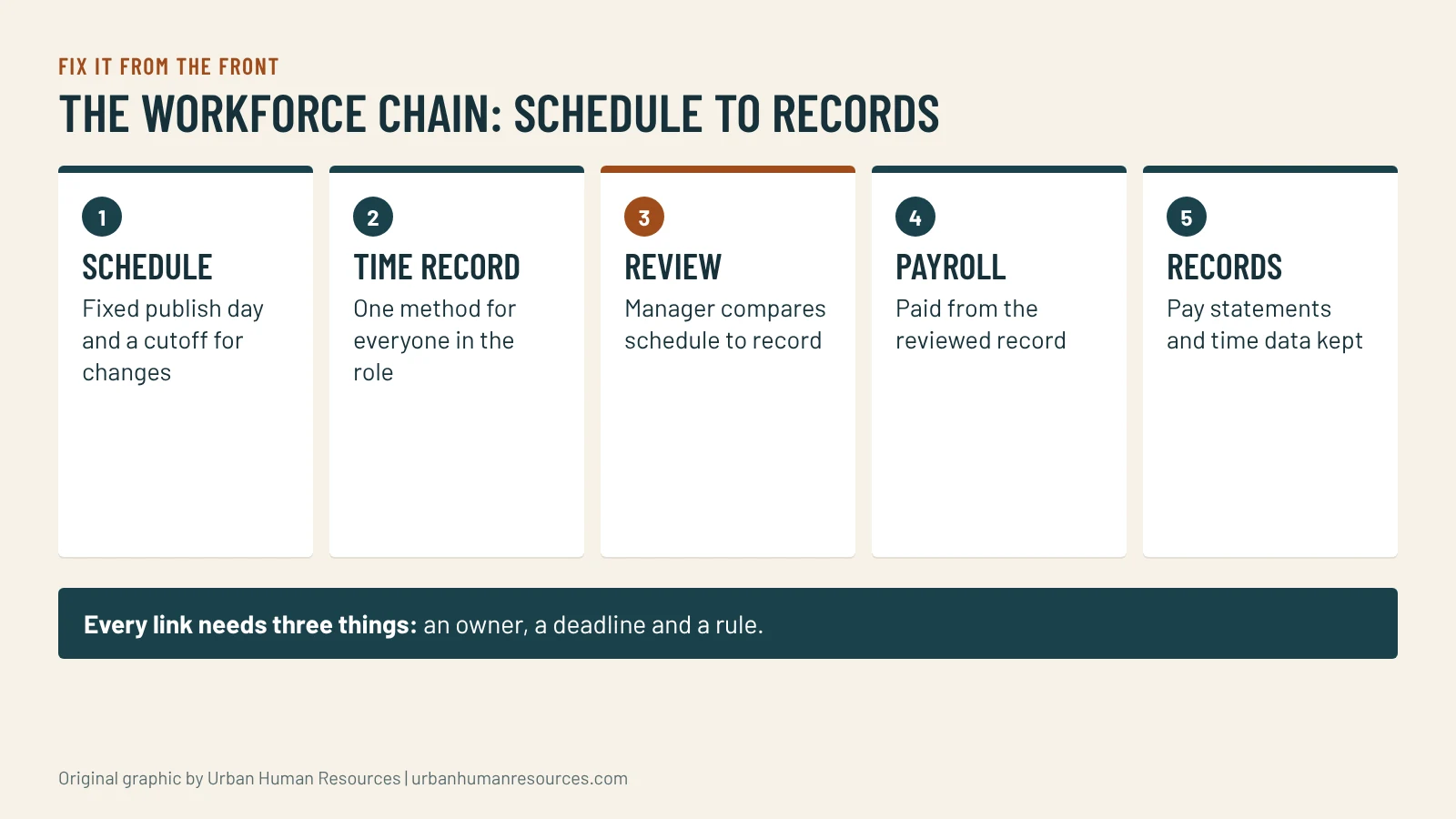
Workforce management is one chain: a published schedule, an accurate time record, a payroll that reads that record and a review before every pay run. Errors start at the first link and show up at the last. Fix the chain from the front by locking schedule changes, recording time the same way for everyone and reconciling before you pay.
Workforce management is one chain: a published schedule, an accurate time record, a payroll that reads that record and a review before every pay run. Errors start at the first link and show up at the last. Fix the chain from the front by locking schedule changes, recording time the same way for everyone and reconciling before you pay.
I am Mac Malbrough. I hold a J.D. and an MS-HRM, I am not an attorney, and I work with small employers whose schedules change daily and whose payroll is only as good as the last person who touched it. This is general information, not legal advice, and the examples are hypotheticals I wrote to show the process.
Why does payroll go wrong in small businesses?
Because payroll is the last step in a chain that nobody looks at as a chain. The schedule lives in a group chat. Hours get recorded on a paper sheet, a punch app or the manager’s memory. Someone then types the numbers into payroll on the deadline day. Every handoff in that chain is a place where a shift gets lost, a swap goes unrecorded or a break is not captured.
When the pay is wrong, the instinct is to fix the paycheck. The better move is to find the link that broke and fix it, or the same error returns next cycle. In my experience the break is almost always at the first or second link: a schedule change that was never recorded, or a time record that depends on someone’s say-so.
What does the workforce management chain look like?
Schedule: who works when, published with enough notice and changed through one channel.
Time record: what actually happened, captured as it happens and by the same method for everyone.
Review: a manager check that compares the schedule to the record and resolves differences.
Payroll: pay calculated from the reviewed record, with the right classification and rate.
Records: pay statements and time records kept where you can find them.
Each link has an owner, a deadline and a rule. When any of the three is missing, the link is weak. Most of what follows is about giving each link all three.
How do you run the schedule so it stops causing pay errors?
Publish it on a fixed day, in one place, with a clear cutoff after which changes need a manager’s approval. The cutoff is the rule that saves the most trouble. Without it, a swap agreed in a text at 9 p.m. becomes a disputed shift at the end of the pay period.
Three habits help.
Record every change in the same tool or sheet, with the date, the people involved and who approved it.
Build in the break plan. If your people are entitled to meal and rest periods, the schedule should show when they happen and who covers the floor. The rules and the penalties for getting them wrong are covered in California meal and rest breaks and PAGA.
Look at the commute and the shift pattern. Schedules that ignore transit and caregiving create attendance problems that look like discipline problems. Attendance and scheduling for transit-dependent employees shows how to write a policy that works for both sides.
If you operate in a city with its own scheduling or wage ordinance, check it before you design the schedule. The Bay Area local employment ordinances page tracks them.
How should you record time?
Use one method for everyone in the same role and make it the only method. A punch app, a shared device or a signed sheet can all work. What does not work is a mix, where some people punch and others report to the manager at the end of the week. The mix is where unrecorded hours hide.
Ask four questions of whatever method you use. Does it capture start, stop and meal breaks? Can an employee see and confirm their own hours? Can a manager correct an entry with a note and a trail? Do you keep the data where you can find it? If any answer is no, the method has a gap.
Every scheduled shift has a matching time record, or a note that explains why not.
Every meal and rest period is recorded or marked as waived where the law allows.
Overtime hours are flagged and reviewed by a manager.
New hires and terminations are entered with the right dates, rates and classification.
Any pay change has a written approval attached.
The totals look reasonable compared with the last run. A swing of more than you expect is a reason to look closer.
Do it the same way each cycle and sign the checklist. A signed checklist is also proof that you reviewed the run, which matters if someone later questions the pay. Where a worker is paid in a way that depends on classification, run the exempt vs non-exempt quick check on any role you are unsure about, because a payroll that is mechanically perfect can still be wrong if the person is classified incorrectly.
What if you find an error after you paid?
Fix it fast, in writing and with the employee informed. Calculate what is owed, pay it in the next run or sooner if the amount is large for the person, and note what caused the error and how you will prevent it. Do not wait for the next pay period out of embarrassment. The cost of a small underpayment rises with delay, and employees who see a prompt correction usually accept it as a mistake. If the error affects several people or goes back several months, get an outside review before you decide how to fix it. The misclassification back pay example shows how fast the numbers grow.
When the same errors return, when you add a second location or a second pay type such as tips or piece rates, or when payroll depends on one person who cannot be replaced. The fix may be software, a payroll service or a part-time bookkeeper, but the sequence matters. Fix the chain first, then pick the tool, because a tool applied to a broken process automates the mistakes. Best HR software for small business and core HR and payroll software compare the options.
Who should own each link in the chain?
Name one person for each link and one backup. The manager owns the schedule and the review. The employee owns confirming their time. Someone in the office, or an outside service, owns the payroll run. The owner owns the rules: the cutoff for schedule changes, the time-recording method and the pre-payroll checklist. Write those assignments on a single page and share it with the managers.
The backup matters because small teams lose people to illness, vacation and turnover, and payroll cannot wait. A written one-page procedure for running payroll, with screenshots if you use software, lets a second person take over without a crisis. Test it once a year by having the backup run a cycle with the primary watching. You will find the missing step before it costs you a late paycheck.
What should you do this week?
Run the pre-payroll checklist on your next cycle and write down every error you catch and which link in the chain caused it. After two cycles you will see the pattern, and the pattern tells you what to fix first. Most owners find that one or two links account for most of the trouble.
McKinley holds a J.D. but is not a licensed attorney. Articles here are general information, not legal advice. For your specific situation, talk with an employment attorney.
Data current as of November 2026. Sources are linked where each figure appears.
This article is general information, not legal advice. Laws change and every situation is different; for advice on yours, talk with an employment attorney.
A 30-minute meal before the end of the fifth hour, 10-minute rest breaks by the four-hour block, and a premium hour for each miss. PAGA turns misses into penalties.
Tips, cash pay and off-the-clock time create the claims that hurt small employers most. The records California requires for time, pay and tips, how long to keep them, the common gaps and…
A late bus is an HR issue, not a character flaw. How reporting time pay, split shift pay and paid sick leave shape a fair California attendance policy for employees who ride…