Published November 6, 2026. Last updated November 9, 2026.
Short answer
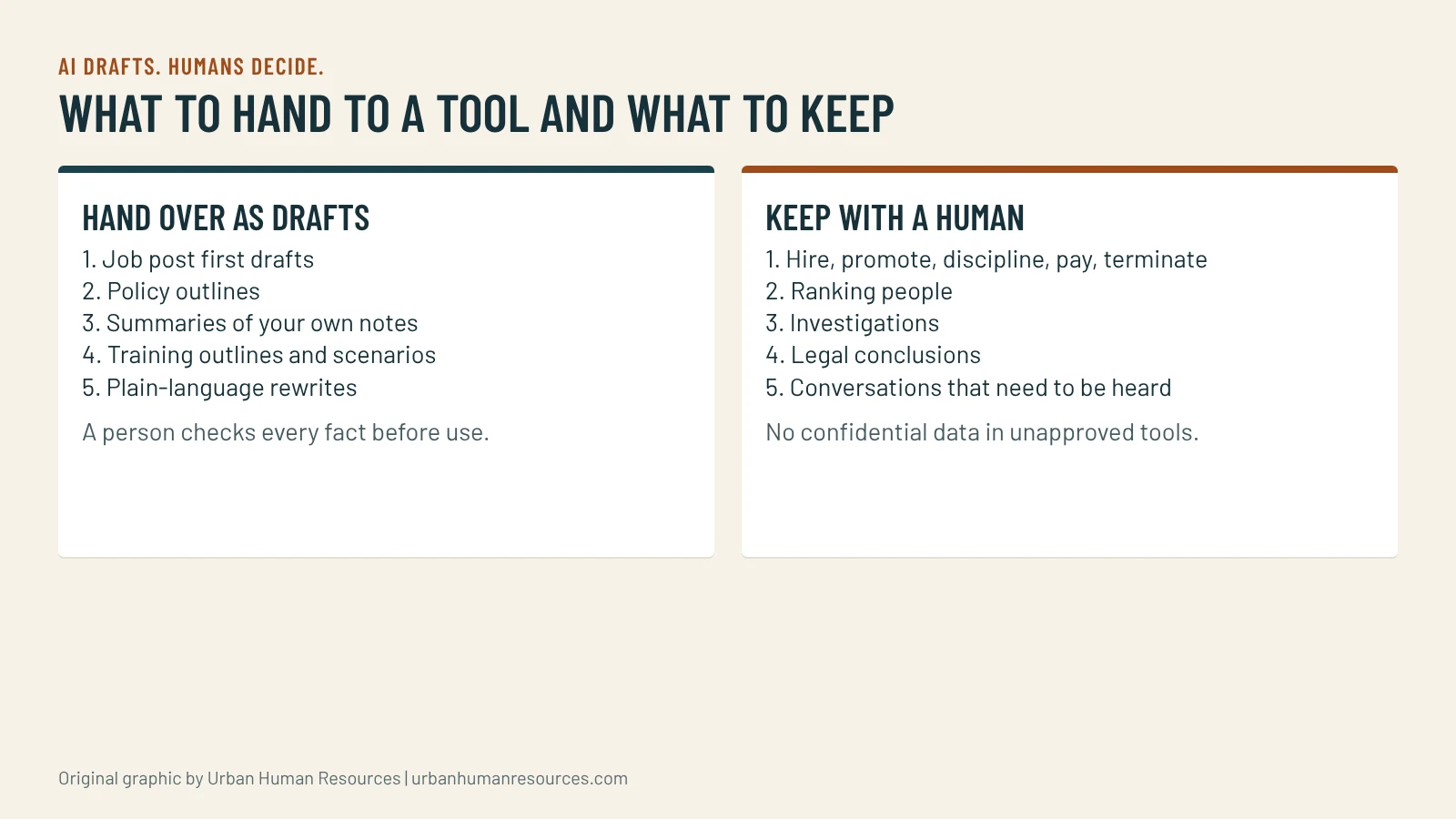
Hand AI the drafting and organizing work in HR, such as first drafts of job posts, policy outlines, meeting summaries and training outlines, and keep every decision about a person with a human. Start with one task, a one-page AI use policy and a rule that no confidential employee data goes into a tool you have not approved.
Hand AI the drafting and organizing work in HR, such as first drafts of job posts, policy outlines, meeting summaries and training outlines, and keep every decision about a person with a human. Start with one task, a one-page AI use policy and a rule that no confidential employee data goes into a tool you have not approved.
I am Mac Malbrough. I hold a J.D. and an MS-HRM, I am not an attorney, and I use AI tools in my own workflow, including to help draft this site, with my review of every piece. I advise small employers on where AI helps HR and where it creates risk. This is general information, not legal advice, and the examples are hypotheticals I wrote.
What is AI actually good for in HR?
It is good at turning a rough idea into a first draft and at organizing text you already have. A job post from a role outcome. An outline for a handbook section. A summary of a long email thread. A set of interview questions built from a competency list. A training agenda from a topic. In each case you give the tool material and it gives you something to edit, which saves the blank-page hour.
It is poor at the things that depend on facts it cannot check or on judgment about a person. It can state a rule that does not exist in your state. It can make up a citation. It can write a confident disciplinary letter that ignores what actually happened. The rule of thumb I give clients is: AI drafts, humans decide, and the human checks every fact.
Which five HR tasks should you hand to AI first?
First drafts of job posts, built from your written role outcomes, then edited for accuracy and the pay range.
Outlines for policies and handbook sections, which you then fill with your real rules and check against the law.
Summaries of your own meeting notes, with names and sensitive details removed or with a tool you have approved for that content.
Training outlines and scenario ideas, such as the practice situations in a manager playbook.
Plain-language rewrites of dense documents, so employees can read them, followed by a human check that the meaning did not change.
All five share three features. The input is something you wrote or may safely share. The output is a draft. A person reviews it before anyone relies on it. Start with one of them and run it for a month before you add another.
Keep it to a page that people will read. Cover six points.
Approved tools: name the tools employees may use for work and say that others are not allowed with company data.
Data rules: no employee medical information, complaints, immigration documents, Social Security numbers or investigation material in any tool unless the tool has been approved for it in writing.
Human review: every AI output that goes to a customer, an employee or a regulator is checked by a person who is responsible for it.
No decisions: AI is not used to make or recommend decisions about hiring, pay, discipline or termination without sign-off from the owner or HR.
Disclosure: say when AI helped, where that matters to the reader, such as a candidate-facing tool or a recording.
Questions: name one person employees can ask when they are unsure.
Add the policy to the handbook once you have settled it, with a signed acknowledgment. The California employee handbook template gives you the structure for the acknowledgment. Review the policy every six months, because the tools and the law both move fast.
How do you protect confidential information?
Assume anything you paste into a tool may be stored, read by the vendor or used in ways you did not expect, unless the vendor’s written terms say otherwise and you have read them. For most small employers, the simplest rule is to strip names and identifying details before you use a general-purpose tool and to avoid sensitive categories entirely. For meeting recordings and note-takers, the stakes are higher because the tool hears everything. AI notetakers in HR meetings and note-takers in investigation and termination meetings explain when to switch them off.
If a vendor says it is secure, ask for the terms in writing and ask where the data goes. Do not rely on a marketing page. Keep a short record of which tools you approved, on what date and for which uses, so you can answer an employee or a regulator who asks.
How do you watch for bias?
Treat every AI output that touches people as something to read critically. A job post drafted by a tool can carry assumptions about age, gender or background in the wording. A set of interview questions can favor certain styles of speaking. A summary can drop the point a quieter person made. Read for it, compare the output to your role outcomes and ask a colleague to read it too.
If you ever use a tool that scores or ranks people, ask the vendor how it was tested for bias, ask for the results in writing and keep records of how you used it. The legal exposure for an employer is real even when the tool came from a vendor. For the story of how a seemingly neutral input can skew a result, see the anomaly trap and the ZIP code.
How do you run a safe first pilot?
Choose one task from the “hand over” list, one person to run it and a four-week window. Before you start, write down what the task costs you now in time and what a good result looks like. During the four weeks, record each use, what you gave the tool, what came back, what you changed and how long the whole thing took. At the end, compare the time and the quality with your baseline and decide whether to keep going, change the method or stop.
Be honest about the results. A tool that saves 30 minutes and adds 20 minutes of checking has saved 10. A tool that produces a polished draft with an error you almost missed is a reminder of the review rule. Keep the notes, because they become the evidence for your next decision.
How does AI change what your people need to learn?
The skills that matter more are the ones the tool cannot do: judgment, fact-checking, clear instructions and conversation. Managers who can brief a tool well and check what it returns will outpace those who accept the first draft. People in entry-level roles, who used to learn by drafting, may need new ways to build skill. How to train junior staff when AI does entry-level work deals with that directly, and what to say when employees fear AI will replace them helps with the conversation that comes with it.
Before you cut any role because of AI, count what the role really does. AI layoffs and rehire costs shows how to map the work first.
What should you do this week?
Write the one-page AI use policy and pick one drafting task for a four-week pilot. Do those two things before you buy anything. The policy protects your data and your people, and the pilot shows you what a tool does in your shop, not in a demo.
If you want help writing the policy, checking it against California law and training your managers, my HR services for small businesses include AI use policies and manager training, and the HR compliance check-up reviews where AI may already be touching your hiring or monitoring.
This article gives a method, not statistics. California’s rules on automated tools and workplace surveillance are covered, with their primary sources, on the pages linked below.
McKinley holds a J.D. but is not a licensed attorney. Articles here are general information, not legal advice. For your specific situation, talk with an employment attorney.
Data current as of November 2026. Sources are linked where each figure appears.
This article is general information, not legal advice. Laws change and every situation is different; for advice on yours, talk with an employment attorney.
Most small California employers fall outside the privacy agency's new AI rules. They do not fall outside the Civil Rights Council's. What to check this month.
AI agents can chase onboarding paperwork and rebalance schedules without a person clicking anything. A guide for a 10 to 150 person California employer to what to hand over, what to keep,…
Otter, Fireflies, Read.ai, Zoom AI Companion, Copilot in Teams and Gemini in Google Meet can all record and summarize a meeting, some without anyone asking. California requires every participant's consent, the Otter.ai…