Fix the data before you migrate it. Seven employee fields cause most rollout failures: legal name, hire date, exempt status, work city, pay rate with its effective date, employment type, and leave balances. Export them, check each against a source document, correct the errors in the old system, then test a sample payroll before go-live. A small employer can do this in a week, and an HR advisor can run the review with you.
Fix the data before you migrate it. Seven employee fields cause most rollout failures: legal name, hire date, exempt status, work city, pay rate with its effective date, employment type, and leave balances. Export them, check each against a source document, correct the errors in the old system, then test a sample payroll before go-live. If you are about to pay for new HR software and your records live in three spreadsheets and a former employee’s inbox, this is the week that decides whether the system helps you or just makes the old mistakes faster. A small employer can do the cleanup in about a week, and an HR advisor can run the review with you.
I am Mac Malbrough. I hold a J.D. and an MS-HRM, I am not an attorney, and this is general information, not legal advice. I wrote about picking a platform in the best HR software for small business and about what it costs in HR software cost for small employers. This post is about the step that comes before either: the data you will load into it.
Why does new software not fix messy data?
An HR system is a container. It stores and reports what you give it, and when the input is wrong the output is wrong with better formatting. I hear the hope often: the new platform will finally give us one source of truth. It only does that if someone decides, field by field, what the truth is before the import.
The cost shows up at the worst moments. The first payroll after go-live shorts an employee because a pay rate carried over from last year. A sick leave balance resets to zero. A report says you have 31 employees when you have 29, and a threshold you thought you were under is not what you thought it was. These are all data problems wearing a software costume, and the vendor will rightly say the system did what it was told.
Which seven fields break a rollout?
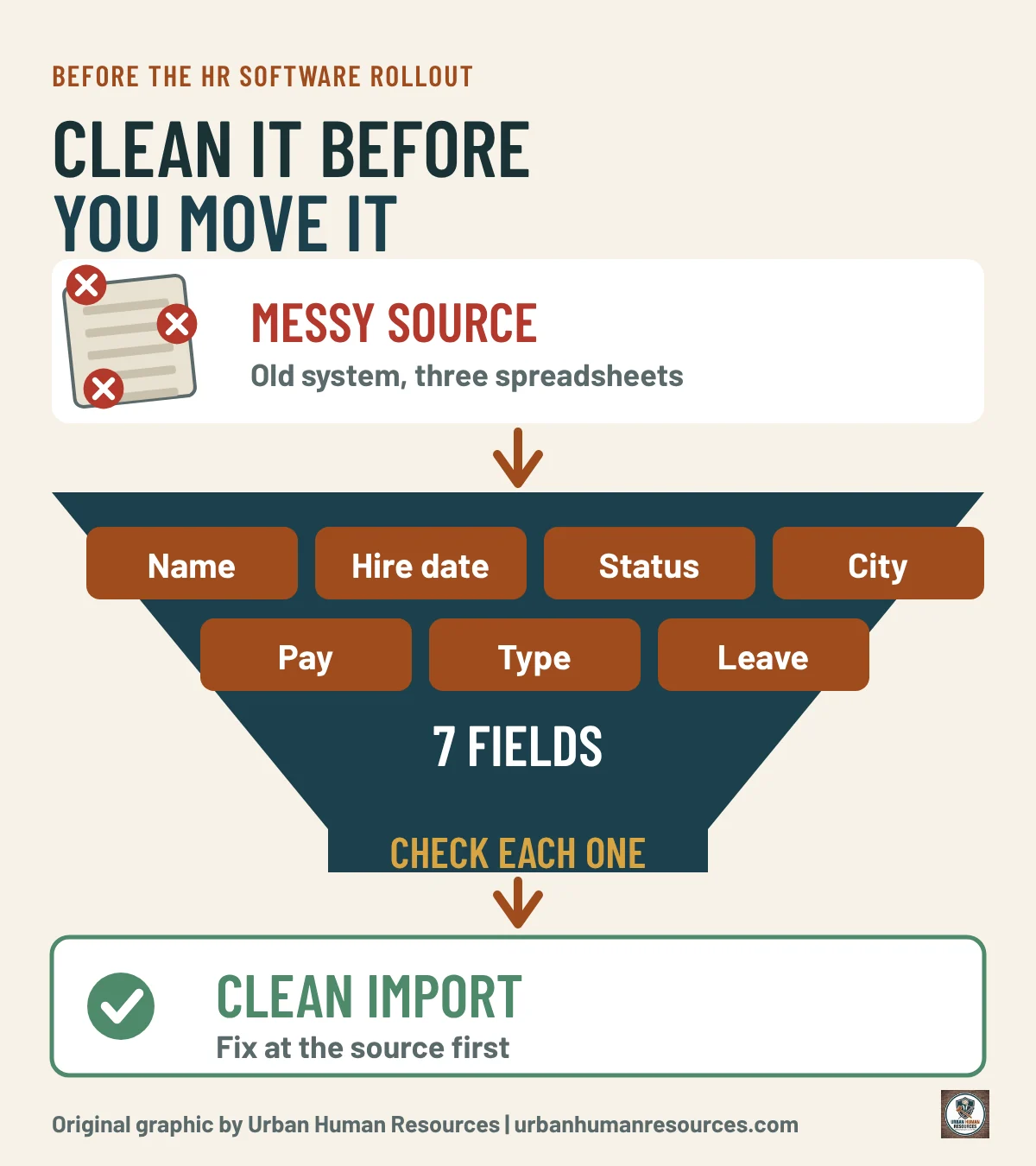
I look at the same seven fields first, because errors in them carry legal or payroll consequences and spread into every report. The graphic below lists them with the question to ask of each.
Legal name: does it match the name on the Social Security card, not a nickname or a married name that was never updated?
Hire date: is it the original start date, and is a rehire recorded as a rehire?
Exempt status: does the flag reflect both the salary and the duties, not only a title?
Work city: is the location where the person actually works, since local minimum wage rules follow the city?
Pay rate and effective date: does every change have a date and an approval behind it?
Employment type: is each person correctly an employee, part-time, seasonal or a contractor held outside the system?
Leave balances: do accrued sick leave and vacation match the policy and the pay stubs?
Original graphic by Urban Human Resources.
What goes wrong in each field?
Names first. The Social Security Administration asks employers to report names as they appear on the card, and a mismatch creates tax reporting headaches that land months later. A new system with a strict name field exposes every nickname you ever typed.
Hire dates drive more than anniversaries. Sick leave accrual starts at the hire date, and tenure-based benefits and probation end dates hang off it. My post on probationary periods in California shows how a wrong start date turns into a wrong end date. Rehires are the usual trap, because a person who left in 2023 and came back in 2025 has two dates, and the system needs both.
How do exempt status and work city create legal risk?
The exempt flag decides whether someone gets overtime. In California an employee generally has to meet both a salary threshold and a duties test to be treated as exempt, and the salary number changes with the state minimum wage. I keep the current figure in my post on the California exempt salary threshold. A title like manager does not make someone exempt, and a system will faithfully pay no overtime to anyone you flag. My free Exempt vs. Non-Exempt Quick Check is a fast way to test each flag before the import.
Work city matters because many Bay Area cities set their own minimum wage above the state’s. If your system defaults everyone to the headquarters address, remote and satellite workers can be underpaid without anyone noticing. I track the local numbers in my Bay Area minimum wage guide.
What about pay rates, worker types and leave balances?
Pay history needs dates because disputes are about when a rate changed. California wage statements must show the hourly rates in effect during the pay period and the hours worked at each rate, so a rate without an effective date is a pay stub problem waiting to happen (Labor Code Section 226(a)).
Employment type needs a decision before import, because a contractor loaded as an employee, or the reverse, creates its own record. If you are unsure about a worker, read my guide to the California ABC test first. Leave balances need a reconciliation: pick a cutoff date, recalculate each balance from the policy and compare it with what the old system says. My overview of California leave laws covers the accrual rules to check against.
What is the one-week cleanup routine?
You can run the routine yourself in five working sessions.
Day one: export every employee record and combine the seven fields into one sheet, one row per person.
Day two: check names and hire dates against the Form I-9, the offer letter and the tax forms.
Day three: check the exempt flag, work city and employment type against duties, salary and where the person works.
Day four: rebuild the pay history with effective dates and reconcile leave balances to the policy.
Day five: fix errors in the old system first, then run a test payroll on a sample of five people and compare to the last real payroll.
Fix at the source. If you correct the data only in the import file, the old system stays wrong, and the next reconciliation reopens every question. When the system goes live, run one payroll cycle in parallel with the old process before you turn the old one off.
What should you ask the software vendor?
Cleaning your side is half the job. The other half is making sure the vendor’s import does what you expect. Ask five questions before you sign. Can I see a test import in a sandbox before anything goes live? How does the system report records it rejects, and do I see every error or only a summary? Can I roll back an import? Who owns the data, and what export do I get if I leave? How do the fields map, and can I see the mapping in writing?
Vendors answer these questions routinely when the buyer asks, and the answers tell you how the project will go. A vendor who cannot show a mapping document in writing is telling you something about the implementation. Keep the answers with the contract, because they are the record of what was promised.
Where does an HR advisor fit?
An advisor adds the second pair of eyes that data work needs and the legal context that a vendor’s implementation team does not carry. As part of an HR compliance check-up, I can review these fields with you and rank the findings by risk, and in ongoing fractional HR work I can stay through the first live payroll. Whatever you choose, the cleanup is yours to keep, and the next system you buy will import cleanly.
What tool puts this in order?
The HR Tech Stack Audit lists your tools, flags overlap and shows what you pay for but do not use, which is the right place to start before a renewal or a switch. My earlier post on the tech stack audit before you renew explains how to use it.
What should you do this week?
Export your employee list and add the seven fields as columns.
Check ten records against their source documents and count the errors.
Flag every exempt employee and test it against salary and duties.
Confirm each person’s work city, especially remote and hybrid staff.
Hold off on signing a software contract until the sample payroll test passes.
If you want help with the review, start with the HR compliance check-up, and the free live sessions cover HR systems and compliance all year.
McKinley holds a J.D. but is not a licensed attorney. Articles here are general information, not legal advice. For your specific situation, talk with an employment attorney.
Data current as of November 2026. Sources are linked where each figure appears.
This article is general information, not legal advice. Laws change and every situation is different; for advice on yours, talk with an employment attorney.
The overview of my five-part HR software series for California small employers: every category mapped, what to buy first, and how I check each platform. No sponsors, no affiliate links.
What HR software and payroll really cost at 10, 25 and 50 employees, with the setup fees, per-run charges, minimums and contract terms that change the bill. Prices checked October 2026.
Small employers pile up HR tools and renew them on autopilot. A one-afternoon audit lists every tool, owner, seat and renewal date, flags overlap and unused seats, and adds a vendor question…